






Directory
Sodium Sync
Directory and Data Synchronisation
Sodium Sync enables synchronization between directory servers and other data sources such as files and databases. Sodium Sync incorporates extensive functionality addressing the complexities encountered when synchronizing data from multiple sources and in scenarios which include constrained bandwidth, transferring data across secure boundaries, at firewalls with ‘air gap’ requirements and across data diodes.

Originally designed as a directory synchronization tool working to and from Isode’s M-Vault, Microsoft’s Active Directory and other LDAP or X.500 directory servers. It has evolved into a comprehensive data synchronization tool with extensive data transformation, correlation and merging capabilities.
Sync Configuration, Scheduling and Workflow
Syncs are configured and scheduled using a Wizard interface which offers immediate access to three common directory to directory sync profiles, four common LDIF transformations as well as access to an Advanced Wizard view giving fine-grain control of the synchronization process. Simple syncs occur as independent events but more complex scenarios exist where it makes sense for syncs to have relationships to each other and to external events. Sodium Sync allows for the grouping of syncs and external events into a Directory Synchronization Workflow. For more information see the page on sync configuration, scheduling and workflow.
Data Transformation, Mapping, Merging & Correlation
Sodium Sync incorporates extensive functionality addressing the complexities of data transformation & mapping, merging & correlation encountered when synchronizing data from multiple sources and in certain scenarios. You can read more about this on the page on data transformation, mapping and merging.
Data Format Support
Sodium Sync’s primary goal is to synchronize directories supporting LDAP or X.500 DAP access.
LDIF (LDAP Data Interchange Format) defines a text format for representing directory data. LDIF files will generally be used to hold data corresponding to a directory subtree. Sodium Sync treats an LDIF file as equivalent to an LDAP or DAP directory subtree, and an LDIF file can be used as source or target for a sync. LDIF can be used to represent a set of actions on a directory, which can also be consider as a ‘delta’. The term ‘change LDIF’ is used to distinguish this type of file from an LDIF file that represents a sub-tree. Change LDIFs are used to support Sync by Email. Change LDIFs can be useful for ad hoc directory management, and so Sodium Sync enables loading of change LDIF, and comparison of two sources and generation of a change LDIF to represent the delta.
There is often the requirement to handle data from other sources with directory synchronization, Sodium Sync provides support for data import and export using two widely used interfaces:
- CSV (Comma Separated Value) format files (RFC 4180).
- SQL Databases.
Access, Authentication and Connection Security
Sodium Sync shares directory access with Isode Sodium directory management GUI, and details are shared with Sodium. Sodium offers a number of security options for the two primary protocol access mechanisms (X.500 and LDAP).
| Security Option | X.500 DAP | LDAP |
|---|---|---|
| Simple Authentication (password) | y | y |
| Strong Authentication (PKI) | y | y |
| Signed Operations | y | |
| Kerberos Authentication | y | |
| TLS data confidentiality | y |
Sync by Email, Air Gap & Data Diode
There are a number of situations where normal directory replication protocols cannot be used. For example:
- In constrained bandwidth environments such as HF radio, where performance will be poor.
- Across secure boundaries, where directory replication and access protocols may not be used.
- At firewalls with ‘air gap’ requirements.
- Over data diodes.
Sodium Sync provides a number of related solutions for these environments. Email is often a practical communication mechanism when directory replication cannot be used, so directory replication over email is a key building block.
Sodium Sync provides capabilities to generate LDIF changes relative to an automatically stored reference copy. This enables Sodium Sync to generate a sequence of change LDIFs, and for another copy of Sodium Sync to robustly apply them, checking for duplicates, missing updates and out of order changes. It can also drive ‘transport’ programs before or after it runs. This provides capability to replicate between directory servers using email, or to provide directory replication across an ‘air gap’ gateway.
More information on synchronization by email and scenarios that require it are given in the whitepaper [Directory Replication by Email and over ‘Air Gap’]. Information on using this capability with M-Switch is given in the whitepaper [File Transfer by Email]. Sodium Sync can also be used to perform directory replication over a data diode, to support directory replication in secure environments with one way data flow.
Extensibility
Commonly used Sodium Sync features are available for GUI configuration. Custom features can be configured using XML templates, with further extensibility by use of scripting languages including Javascript.
Attribute syntax checks and custom data mappings can be defined in XML. XML provides a flexible mechanism for mapping information, that includes selection and transformation of attribute values using regular expressions. When this is insufficient, mappings can be extended by the user of scripting
Sodium Sync supports scripting languages using the JSR 223 interface. Javascript is built in (with sample profiles written in Javascript provided) and a wide range of other scripting languages can be loaded including JACL, jRuby and jython. This support enables complex mappings to be specified, for example mappings requiring access to an external database.
Performance & Scaling
The basic operational mode of Sodium Sync does a “full update” on each run. This works by reading data from both directories, and then applying any necessary changes to the target directory. This is robust, straightforward, and works with any LDAP or DAP directory. Sodium Sync works by streaming data, and minimizes the amount of data it holds at any time. This enables it to scale to synchronize very large directory information trees. On a modern Core i5 machine, between fast directory servers such as Isode’s M-Vault, typical performance for Sodium-Sync is around 300 entries per second. This makes it practical to synchronize several thousand entries with updates at very short intervals.
Syncs are configured and scheduled using a Wizard interface which offers immediate access to three common directory to directory sync profiles, four common LDIF transformations as well as access to an Advanced Wizard view giving fine-grain control of the synchronization process.
Configuration
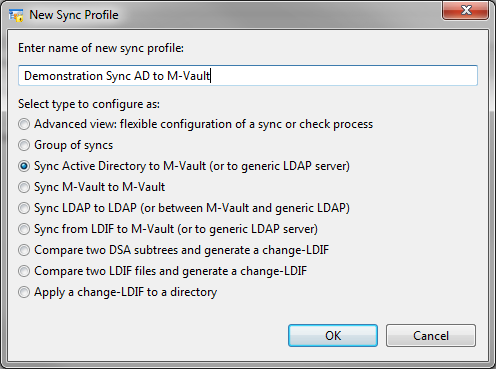
New syncs are configured via a wizard which offers immediate access to a number of synchronization options:
- 3 common directory to directory syncs.
- 4 common LDIF transformations.
- Go straight to Advanced view
- Group syncs into a directory replication workflow.
Some of these sync options will lead to a Simplified view of the Sync Wizard, consisting of Source & Target and Scheduling tabs. Others will go directly to an Advanced view which has additional tabs, as shown in the following screenshot.
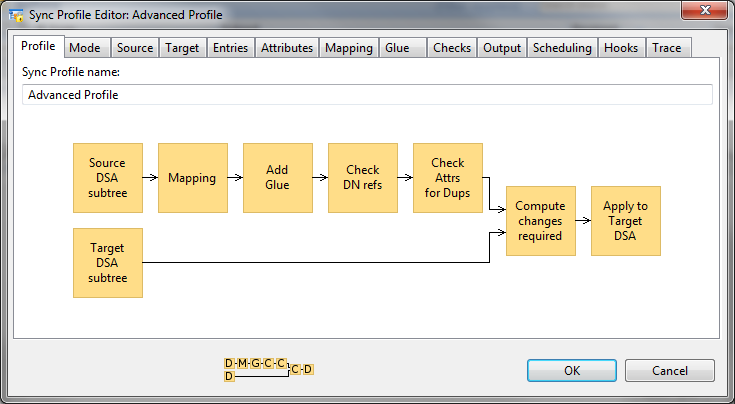
The front profile screen gives a workflow diagram of the core functions, the diagram will adapt as different options are chosen in the tabs which define options, including those described below.
Mode
A sync can be configured to operate in a number of different modes:
- Source Only: This sync operates without a target, the primary use of this mode if for checking data.
- Complete Scan: The standard mode of operation used for directory to directory syncs. Source and target (which can be independently configured as directory, LDIF, CSV or SQL) are compared and changes applied to the target.
- Cached Scan: This varient uses a cached copy of the target directory, which the sync will update. This has the advantage of removing the need to read data from the target, which reduces network overhead. This mode is essential for sync over email and related modes where it is not possible to read data from the target directory.
- Recreate: Where a standard sync will calculate changes and apply only necessary changes to the target, this mode will delete the target and fully load each time.
- LDIF: This mode takes a change LDIF (an LDIF representing a set of changes to be applied to a directory) as input.
- Queues: This mode takes as input a sequence of LDIF file and is designed to support sync by email and related modes
Source and Target
Source and target tabs control where data is coming from and where it is going to. Where to source or target is a directory server, the server is referenced by a bind profile that is configured to connect to that directory at the point of the DIT (directory information tree) used. For the source, options exist to handle aliases either as a mechanical copy or be de-reference (so that the target gets the data from the entry that is pointed to by the alias).
Checks
A number of checks can be configured including a referential integrity check, constraint on update size and a check that a given attribute is unique. Attribute syntax checks can also be configured by defining custom XML.
Output
The Output tab gives a number of options for the final step of the sync:
- Discard changes
- Apply changes to the target (this is the standard approach).
- Apply changes to another directory.
- Generate a change LDIF file.
- Generate a change LDIF file for a queue, this is in support of synchronizations by email.
- For a source-only scan, the set of output options is LDIF, CSV and writing to a different area of the source directory.
Trace
The final tab, Trace, gives a number of trace, logging and debug options.
Sync Scheduling
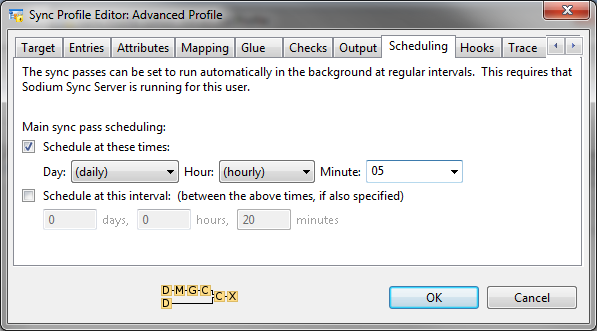
Sodium Sync enables independent scheduling of multiple syncs. Regular syncs can be scheduled daily, hourly or on specified days of the week or month. Syncs can also be specified with an interval so that a sync will start a configurable time after the previous sync has finished.
When unscheduled tasks are run from the Sodium GUI, status and errors are shown interactively. Sodium Sync Manager (below) can be run at any time to check on the status of synchronizations.
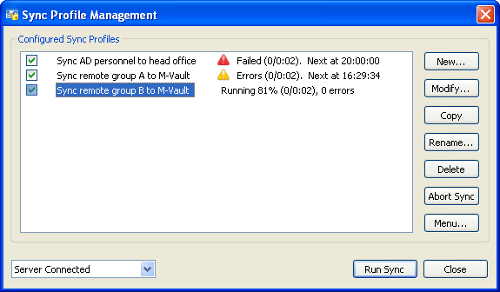
When there are problems this screen can be used as an entry point for diagnosing problems and accessing error logs. Any errors are also logged as Isode events. These events can be monitored using any of the approaches available as part of the Isode event system.
Workflow
Simple syncs occur as independent events but more complex scenarios exist where it makes sense for syncs to have relationships to each other and to external events, for example:
- To sync data inwards from an external source before sending a sync outwards to multiple targets.
- Running a database report generation program to generate a file, prior to loading via a sync.
- Load in data, check its validity, and publish automatically via another sync if the checks succeed. It the checks fail, publication will not happen. This will ensure operator checking, and that the published data has always been checked.
Grouped Syncs
This type of capability is referred to as ‘Directory Replication Workflow’. The first feature to support this is Group Syncs. A sequence of syncs and checks can be grouped together, so that they are run in order and subsequent syncs will only run if the previous ones succeed. This can help with situations where data is brought in from multiple sources and then sent onwards. It can also bring in remote data, perform processes, and then only transmit onwards if a series of checks succeed.
This enables the definition of a new group and defines error handling proceedures. Groups are shown on the management screen and syncs in a group can be run independently or as a group. Commands can be specified to run before and after a sync, allowing external processes to be integrated with the directory replication workflow.
A key capability of Sodium Sync is transformation of data between source and target. When synchronizing data, variations in data and schema can lead to a number of requirements, such as:
- Military directories will generally follow ACP 133. In practice different nations will operate services that follow specific national variants.
- Microsoft Active Directory implements LDAP but deviates from the standard in a number of ways.
- Moving data between services often occurs at boundaries leading to requirements to remove data or to map the data to give a different view.
- When data is merged from multiple sources there needs to be clear control over where specific data comes from to ensure that a given source does not interfere with data from another source.
The entries tab of the Sync Profile Wizard controls what is synchronized within the specified point of the DIT. Filters can be applied to source or target, an LDAP filter can be applied (for example to select only entries of a given object class), entries can be limited to a specific depth and specific subtrees of the DIT can be excluded.
The attributes tab gives control of attribute handling on the selected entries; detailed options can be seen by clicking on the screenshot above. Attribute filters provide a number of actions:
- To allow through a configured set of attributes.
- To allow through all attributes, except for a configured list.
- To delete the entry (block all attributes).
- To control the values of the object class allowed through.
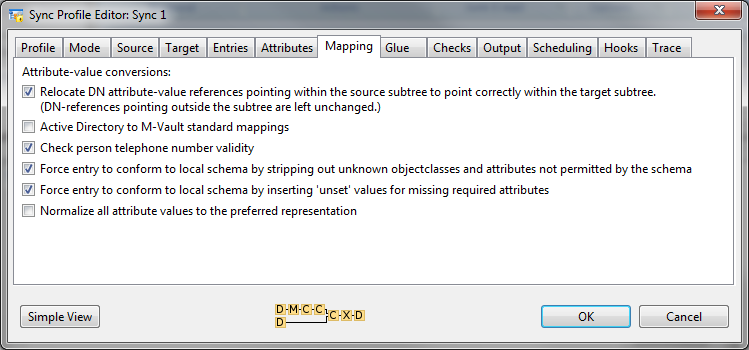
The Mapping tab gives access to a number of built in mappings and to custom mappings (which can be defined in XML).
The Glue tab gives a number of options to deal with a problem that occurs in some configurations where an entry is replicated and its parent entry is not present (e.g. because it was filtered out). This can be used to remove levels in a hierarchy and ‘flatten’ the directory tree.
Data Checks
The Checks tab allows the configuration of a number of standard checks:
- Referential Integrity is applied to all attributes with Directory Name syntax, to verify that they point to a directory entry that exists.
- Update size can be constrained, primarily to ensure that unintentional major changes or deletions are not propagated.
- Check that a given attribute is unique, for example to ensure that no two users have the same telephone number. This is important for syncs into Active Directory as email address must be unique for Exchange.
Attribute syntax checks can also be configured by defining custom XML. Selection of this text is then done in the mapping tab.
Merging & Correlation
Sodium Sync can be used to provide a simple sync process such as from a sub-tree in one Directory (or other data source) to another Directory. However Sodium Sync’s merging and correlation functions allow it to be used to handle more complex setups such as bringing data from multiple different directory services into a single central directory.
While this sort of task can be addressed by setting up a series of independent synchronizations, it’s often desirable to merge data. Sodium Sync supports data merging based on a model that every piece of data has a clear master location, ensuring that the overall state can be determined definitively.
- Every entry must have a directory which is authoritative for naming.
- Every attribute within an entry must have a directory which is authoritative for the value of that entry.
Correlation
The setup described above assumes consistent naming between all of the sources and target. As this will not usually be the case, Sodium Sync includes correlation functionality needed to provide consistency between data sources. Correlation is also important when using non-directory sources in order to manage the mapping of that data onto a directory structure.
Managed by a GUI Interface correlation allows a specific 1:1 mapping for data items to be configured. Correlations can be extended by the scripting interface to support specialized situations.
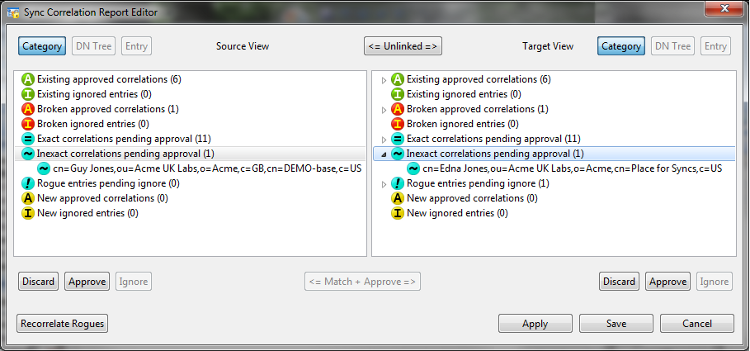
A sync correlation report can be generated (above) which shows:
- Correlated entries.
- Entries that were correlated but have become problematic due to data changes.
- Suggested matches (and misses) for data that is not correlated.
Correlated entries can be ignored (if on one side only), discarded or approved.
LDAP Support
The following LDAP standards are supported by Sodium Sync.
| RFC 4511 | LDAP: The Protocol. J. Sermersheim, June 2006 |
|---|---|
| RFC 4512 | LDAP: Directory Information Models. K. Zeilenga, June 2006 |
| RFC 4513 | LDAP: Authentication Methods and Security Mechanisms. R. Harrison, June 2006 |
| RFC 4514 | LDAP: String Representation of Distinguished Names. K. Zeilenga, June 2006 |
| RFC 4515 | LDAP: String Representation of Search Filters. M. Smith, T. Howes, June 2006 |
| RFC 4516 | LDAP: Uniform Resource Locator. M. Smith, T. Howes, June 2006 |
| RFC 4517 | LDAP: Syntaxes and Matching Rules. S. Legg, June 2006 |
| RFC 4518 | LDAP: Internationalized String Preparation. K. Zeilenga, June 2006 |
| RFC 4519 | LDAP: Schema for User Applications. A. Sciberras, June 2006 |
| RFC 4346 | The Transport Layer Security (TLS) Protocol Version 1.1. T. Dierks, E. Rescorla, April 2006 |
| RFC 4532 | LDAP: “Who am I?” Operation. K. Zeilenga, June 2006 |
| RFC 4530 | LDAP: entryUUID Operational Attribute. K. Zeilenga, June 2006 |
| RFC 4522 | LDAP: The Binary Encoding Option. S. Legg, June 2006 |
| RFC 3673 | LDAP: All Operational Attributes. K. Zeilenga, December 2003 |
| RFC 3672 | LDAP: Subentries in the Lightweight Directory Access Protocol (LDAP). K. Zeilenga, S. Legg, September 2003 |
| RFC 3671 | Collective Attributes in the Lightweight Directory Access Protocol (LDAP). K. Zeilenga, December 2003 |
| RFC 3045 | Collective Attributes in the Lightweight Directory Access Protocol (LDAP). K. Zeilenga, December 2003 |
| RFC 2849 | The LDAP Data Interchange Format (LDIF) – Technical Specification. G. Good, June 2000 |
| RFC 2696 | LDAP Control Extension for Simple Paged Results Manipulation. C. Weider, A. Herron, A. Anantha, T. Howes, September 1999 |
Other Internet Standards
| RFC 4180 | Common Format and MIME Type for Comma-Separated Values (CSV) Files.Y. Shafranovich, October 2005 |
|---|
X.500 Support
| ITU X.500 | The Directory: Overview of concepts, models and services, ISO/IEC 9594-1, 2005 |
|---|---|
| ITU X.501 | The Directory: Models, ISO/IEC 9594-2, 2005 |
| ITU X.509 | The Directory: Authentication framework, ISO/IEC 9594-8, 2005 |
| ITU X.511 | The Directory: Abstract service definition, ISO/IEC 9594-3, 2005 |
| ITU X.521 | The Directory: Selected object classes, ISO/IEC 9594-7, 2005 |
| ITU X.525 | The Directory: Replication, ISO/IEC 9594-9, 2005 |
Ready to request an Evaluation?
Thankyou for considering Isode’s software products. To request an evaluation, please select the product(s) you are interested in, then fill out the enquiry form.
Select your Evaluation products:
Customer Portal
For access to our customer portal, please log in below.
If you are having trouble accessing the portal, please contact your account manager, who will be happy to help.
Need help with your account? Contact us