






XMPP and Security Labels
Published: 13 January 2025
This white paper looks at how Security Labels are used with XMPP instant messaging, which is a core capability to support Data Centric Security (DCS). The paper starts by setting out the primary requirements and benefits of using security labels with XMPP. It then gives a high level summary of the model used and illustrates the user experience with Isode’s Swift client to achieve these goals.
The rest of the paper goes into technical details of the standards and approaches needed and how these are addressed by Isode’s product set. This covers client, server and cross domain capabilities.
Key Requirements
These are the core requirements considered.
- To show the user the security label associated with all data. Users in target environments will understand how to handle data based on this.
- In a Multi-User Chat (MUC) room, to make clear to users the default label for the room, to set expectations on what is appropriate to discuss.
- To ensure that all messages sent to a user have labels that the user is cleared to access. This and the next requirement are central to DCS provision.
- Where messages are sent to a peer system (server to server), security labels on data are valid for the channel. This is of particular importance for cross-domain traffic.
- To work when different domains use different security policies and different security label technologies.
Core Model of XMPP with Security Labels
Security Labels, Security Clearances and Security Policy to provide access control are explained in the whitepaper [Access Control using Security Labels & Security Clearance]. Key points:
- Security Labels contain structured information.
- Security Marking is a user-oriented rendition of a security label.
- Security Labels are applied to information. For XMPP, this means that security labels are applied to message stanzas.
- Security Clearances are associated with Users and Channels.
- Access control is applied by comparing a Security Label against a Security Clearance in the context of a security policy.
User Experience
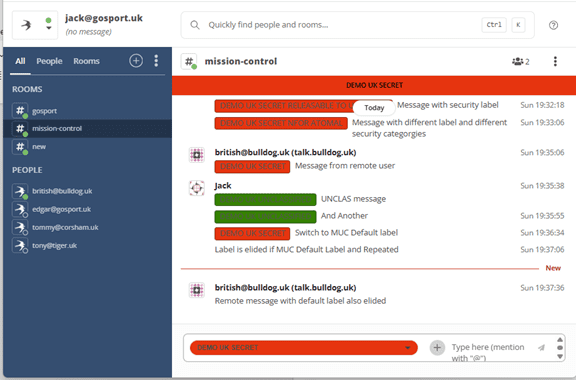
The core of security label usage can be illustrated by Isode’s Swift XMPP client. Key points to observe:
- Security markings are associated with messages so that the user can see the Security Label associated with a message.
- A Security Marking is provided for the MUC rooms shown, which reflects a Default Security Label associated with the MUC room. Note that this default security label is providing guidance on MUC room usage and is not labelling any information.
- If a message has a security label that is the default security label and is preceded by another message with the same label, the label is not shown on that message. This optional eliding process leads to a cleaner user experience in the common situation where most or all messages use the default security label. A message without a security label is clearly marked.
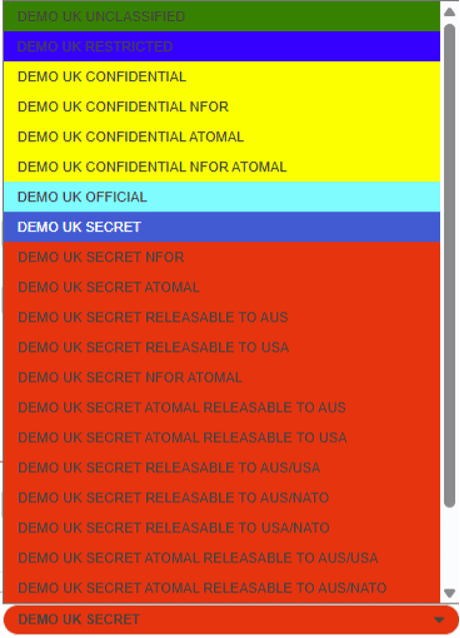
4. When composing a message, the user can select Security Label from a drop-down menu. This makes it easy to select an appropriate Security Label for a message. The UI will only present Security Labels for which the message recipient is cleared. This filtering means that the user can only send messages which are expected to pass access control checks.
Security Label Technologies for XMPP
There are two significant approaches to security labels for XMPP, described below.
XEP-0258
XEP-0258 “Using Security Labels in XMPP” specifies a widely used approach to supporting security labels for XMPP. It provides a mechanism which is lightweight for XMPP clients, with most functionality provided server-side. It can be used to carry any security label, but is commonly used with ESS Labels standardised in RFC 2634 “Enhanced Security Services for S/MIME”.
XEP-0258 security labels are carried in message stanzas. For example:
<message to=’romeo@example.net’ from=’juliet@example.com/balcony’>
<body>This content is classified.</body>
<securitylabel xmlns=’urn:xmpp:sec-label:0′>
<displaymarking fgcolor=’black’ bgcolor=’red’>SECRET</displaymarking>
<label><esssecuritylabel xmlns=’urn:xmpp:sec-label:ess:0′>
MQYCAQQGASk=
</esssecuritylabel></label>
</securitylabel>
</message>
The label is carried in a <securitylabel/> element in the message stanza. XEP-0258 clients will display this label using the security marking, comprising:
- Text: SECRET
- Foreground Color: Black
- Background Color: Red
The actual ESS label is ignored by the client and only handled by the server. This keeps the client simple.
XEP-0258 also specifies a catalog retrieval protocol, where an XMPP client can retrieve a label catalog suitable for use between a specified pair of JIDs. The server will filter a configured catalog based on access control for the JIDs in question. This enables the client to be confident that any label selected will work.
STANAG 4774 – NATO Confidentiality Labels
NATO has standardized Confidentiality Labels in STANAG 4774 as part of a family of DCS standards. STANAG 5663 is the “lead” DCS specification. These security labels are starting to be used for XMPP and it is anticipated that these will replace XEP-0258 in due time. Isode plans to fully support STANAG 4774 in its product set. Details on STANAG 4774 and Isode plans are in the white paper “Isode Approach to Data Centric Security using NATO Confidentiality Labels”.
Here is a simple example of using a STANAG 4774 Confidentiality Label in an XMPP message stanza:
<message xmlns=”jabber:client” id=”72d57127-17cc-45a8-8ec6-8af27119abec” to=”juliet@example.com/b8402ed4-c80e-478d-bcf6-a721fb32cd6e” type=”chat”>
<body>Short Message.</body>
<BindingData xmlns=”urn:nato:stanag:4778:profile:xmpp:1:0″>
<BindingDataObject>
<BindingInformation
xmlns=”urn:nato:stanag:4778:bindinginformation:1:0″>
<MetadataBindingContainer> <MetadataBinding> <Metadata>
<originatorConfidentialityLabel xmlns=”urn:nato:stanag:4774:confidentialitymetadatalabel:1:0″ ReviewDateTime=”2034-04-18T09:26:56Z”>
<ConfidentialityInformation>
<PolicyIdentifier URI=”urn:oid:1.3.6.1.4.1.31778.102.25″>CWIX25</PolicyIdentifier>
<Classification>SECRET</Classification> </ConfidentialityInformation>
<CreationDateTime>2025-04-18T09:27:52Z</CreationDateTime> </originatorConfidentialityLabel>
</Metadata>
<DataReference URI=””></DataReference>
</MetadataBinding> </MetadataBindingContainer> </BindingInformation> </BindingDataObject> </BindingData>
</message>
The structure of the message is color-coded:
- Black is the XMPP message stanza.
- Blue is the STANAG 4774 confidentiality label
- Green is the STANAG 4778 binding information that binds the label to the message.
Note that only the structured security label is present, and no user-oriented security marking. This means that the XMPP client needs to utilize the security policy, encoded as a SPIF (Security Policy Information File), to determine how to correctly present a label to a human user. This security label awareness means that a STANAG 4774-capable XMPP client will be more complex than one only supporting XEP-0258.
Isode’s approach for the Swift XMPP client is to use the XEP-0258 catalog mechanism, which works well. XEP-0258 catalog format is label independent, so can carry STANAG 4774 labels. This means that the client can rely on the XMPP server to provide access control and DCS capabilities.
Advanced Client Capabilities
Core XMPP client capabilities are described above. There are a number of additional capabilities that STANAG 4774 enables, which are described below. Isode plans to add all of these to Swift.
Label Composition
Drop-down catalog selection is a convenient way to handle frequently used labels. Security policies usually have far too many labels for it to be practical for all of them to be included in a catalog. This gives a problem if a user wishes to use a label not in the provided catalog. The solution will be to provide Swift with a SPIF-driven mechanism to create any valid label, likely based on the capability provided in Isode’s Harrier messaging client.
Multi-Language
Many security policies allow for security markings to be presented in different languages. For example, the NATO security policy supports both English and French markings. This is supported by the Open XML SPIF technology that is used for the NATO SPIF and is used in the Isode product set.
Swift will support multiple languages, with default language being taken from the system on which the client is running, with option to override.
Forms
XMPP supports forms specified in “Form Discovery and Publishing (FDP): XEP-0346”. NATO and NATO countries make extensive use of this capability. Details are provided in the Isode white paper “Military Forms using XMPP”.
Forms are often used for critical data, and so it is important to provide security labels for forms. NATO is working on an extension to STANAG 4778 to bind STANAG 4774 confidentiality labels to XEP-0346 forms. Isode plans to support this extension in Swift.
File Transfer
XMPP is commonly used to share files. The commonly used mechanism to achieve this is “XEP-0363: HTTP File Upload”. The sender uploads a file to the server and then shares a URL link to the file with users or MUC rooms.
It is desirable to provide security labels for transferred files. The NATO approach for labelling files is to include the label within the file (or associate with the file) using a mechanism specified in STANAG 4778. Isode plans to support file-labelling with Swift for XMPP file transfer.
XMPP Server Capabilities
The lightweight approach taken by Isode to XMPP client handling of security labels, which is anticipated to be used by most other XMPP clients, puts significant requirements on XMPP servers to provide access control, which is central to DCS.
This section describes the approach to Access Control taken in Isode’s M-Link product. This is aligned to the NATO standards and fully supports the examples of XMPP usage given in STANAG 5663.
Access Control Management
STANAG 5663 calls uses the term Confidentiality Metadata Based Access Control (CMBAC – pronounced “come back”) for Access Control checking using Security Labels and Security Clearances in context of Security Policy Message Access Control. The rest of this paper uses the term CMBAC to reference this type of access control.
Security Labels on messages will usually be chosen by the sending user and CMBAC applied in various places to check against Security Clearances. STANAG 4774 defines a Security Clearance format, which is Isode’s preferred format, noting that other formats are also supported.
Security Clearances are often associated with users. Isode’s approach to managing this is to store User Clearance in the user’s directory entry. Cobalt, Isode’s provisioning tool, can be used to manage this.
Other Security Clearances and Security Labels noted below are configured as a part of M-Link configuration management.
Message Control with CMBAC
A primary function of an XMPP server like M-Link is to switch XMPP messages. CMBAC is used to control XMPP message stanza delivery and enforce DCS. A number of CMBAC checks are made on every message, grouped as Entry CMBAC, Internal CMBAC and Exit CMBAC. A message is only handled if all of these checks pass.
Entry CMBAC
The source of any arriving stanza is considered and will only be accepted if CMBAC passes for the message security label. There are two options:
- For messages from a client, the check is against the Security Clearance of the sender.
- For messages from a peer server, the check is made against the optionally configured Security Clearance of the peer.
Internal CMBAC
There is a three-level hierarchy of internal CMBAC checks. Each level provides a useful check and also sets a default for the level below, which can be convenient to simplify configuration.
The top level CMBAC check is on security clearance of the entire server. This check will ensure that the M-Link server only handles messages with Security Labels which are appropriate for the server to handle.
Each M-Link server supports one or more domains of the following types: IM (Instant Messaging), MUC, Pubsub and FDP. A domain may be configured with a security clearance, which is used for CMBAC on each stanza for the domain.
MUC, Pubsub and FDP domains have a third level. For MUC domains, this is the MUC room, which may have an associated security clearance. This enables CMBAC control of which messages are handled by a MUC room.
For a MUC room, CMBAC handling is treated in two independent stages.
- Delivery of message to the MUC room. This is controlled by the model described and does not consider MUC room members.
- Delivery from the MUC room to each MUC room member. CMBAC is also applied as described. This means that some messages may be accepted by a MUC room, but CMBAC will restrict message delivery so that a given message is only received by selected MUC room members.
Exit CMBAC
The destination of a stanza is considered and will only be accepted if CMBAC passes for the message security label.
There are two options:
- For messages being delivered to a client, the check is against the security clearance of the recipient.
- For messages being delivered to a peer server, the check is made against the optionally configured Security Clearance of the peer.
Parameter Defaulting
M-Link provides defaulting of key parameters:
- User Security Clearance can be defaulted. This is convenient if some users do not have Security Clearance provisioned, particularly if all or most users have the same clearance.
- Security labels can have defaults. This can be useful to support clients who do not set security labels, and so M-Link can add a default. The security label can be defaulted for a peer, which does not always set the security label on messages.
XEP-0258 Catalog Provision
M-Link uses XEP-0258 to serve label catalogs to clients for both XEP-0258 and STANAG 4774 labels. A catalog may be configured for each IM Domain supported by an M-Link server.
A client requests a catalog for sender and receiver. M-Link applies a filter using the message CMBAC described above. This ensures that the client is only offered labels which will pass the CMBAC checks and be accepted by the server.
User Access Control using CMBAC
The primary DCS checks are on messages. M-Link offers a related check to control access using CMBAC, which is applied using the same three levels as the internal CMBAC for messages checks.
The top level is server, which works by associating a security label with the server. CMBAC is performed between this label and the user’s security clearance. This allows a server to restrict access to users with appropriate clearance.
This same CMBAC model can be applied to domains of all types and to MUC rooms. So, a MUC room can be configured with a Security Label to control which users can join the MUC room based on Security Clearance of the user. This is additional to the message checks.
Note that the Security Label for a MUC room to control access is independent of the MUC room default security label, which is displayed in the MUC UI, although they may have the same value.
Federation and Cross Domain
The controls described above relate to XMPP federation and control of messages to peers. An important special case of federation is support of cross-domain. The capabilities described in this section can be used within a domain but are of most interest Cross Domain.
Policy and Protocol Mapping
The product description so far is for a model of deployment where all parties use the same security policy and same security label format (XEP-0258 or STANAG 4774). This assumption will not be true for different domains and even for different components within a domain.
To address this, M-Link provides a security label mapping capability that can be configured on a per-peer basis. This enables:
- Mapping to a different security label format, in particular, giving a choice of XEP-0258 and STANAG 4774.
- Mapping to a different security policy (e.g., UK to French) makes use of a mapping SPIF with appropriate equivalencies configured.
Boundary Control
The central part of Cross cross-domain is to ensure security at the boundary and to ensure that only desired traffic flows across the boundary. Isode’s XMPP cross-domain solution, using M-Link Edge and M-Guard products, is described in the Isode white paper “Isode’s XMPP Cross Domain Solution”.
The cross-domain solution includes security label checks for both XEP-0258 and STANAG 4774 labels. The model is to explicitly list the Security Labels which are allowed through. This is convenient for typical cross-domain deployments, which will limit cross-domain to a very small number of labels. This check is equivalent to CMBAC. The approach would not be convenient generally, as many situations would need long lists of labels.
Isode Product Status
This white paper is describing some capabilities not in the current Isode product set, particularly those related to STANAG 4774. This section summarizes plans to fully complete features noted in this white paper.
Cross-domain capability is fully supported now with M-Link Edge 19.4 and M-Guard 1.5.
Swift 6.1 (XMPP Client) supports all XEP-0258 features. STANAG 4774 has been shown as a prototype and will ship in Swift 6.2 in Q2 2026. The Advanced Client features are not yet scheduled.
M-Link 19.4 supports XEP-0258. STANAG 4774 support is planned for M-Link 19.5; a pre-release is planned to be available for CWIX 26 (Q2 2026).
Note that M-Link 19.4 does not support independent CMBAC for MUC. This will be addressed in a future release. A workaround is to configure a MUC domain for each desired set of CMBAC controls.
Conclusions
This white paper has shown how Security Labels are supported in XMPP and the Isode product set, including client, server and cross-domain. Support of CMBAC in M-Link is crucial to providing DCS.
Whitepaper Licensing
Isode whitepapers are licensed under a Creative Commons Attribution-ShareAlike 4.0 International License

Browse Related Whitepapers
